.svg "novoserve-dedicated-server-provider-logo")
Storage is no longer a secondary consideration in modern dedicated server design. For many workloads, storage latency, throughput, and consistency are the primary limiting factors — not CPU or memory. Choosing between HDD, SATA SSD, and NVMe SSD directly determines how your applications behave under load, how predictable performance is, and how efficiently your infrastructure scales.
Below is a deep comparison of HDDs, SATA SSDs, and NVMe SSDs, explains where each technology still makes sense, and shows how to design an optimal storage server configuration using NovoServe’s dedicated server solutions. The goal is not to push the newest technology blindly, but to align storage architecture with real-world workloads.

Storage architecture today
A decade ago, processor performance was often the bottleneck in server systems. Today, multi-core CPUs with high clock speeds and large memory footprints are widely available. In contrast, storage subsystems are frequently the weakest link.
The reason is simple: applications increasingly depend on fast, random access to data. Databases, virtual machines, containers, analytics pipelines, AI workloads, and high-traffic platforms all generate I/O patterns that punish slow storage. Even small increases in latency are multiplied thousands or millions of times per second.
As a result, understanding storage technologies — and their interfaces — is critical when building a modern dedicated server.
HDD mechanical storage
Hard disk drives (HDDs) store data on spinning magnetic platters accessed by a moving read/write head. Performance is constrained by physical movement: seek time, rotational latency, and RPM.
Even high-RPM enterprise HDDs operate with access latencies measured in milliseconds. Random I/O performance is particularly limited, which makes HDDs unsuitable for I/O-intensive workloads.
However, HDDs still have legitimate use cases:
- Cost-efficient capacity: HDDs offer the lowest price per terabyte.
- High-density storage: Large-capacity drives make it possible to build multi-hundred-terabyte servers.
- Long-term data retention: HDDs are well-suited for archival data, backups, and cold storage.
In practice, HDD-based servers are commonly used for backup platforms, object storage, media archives, and large NAS or RAID arrays where throughput matters more than latency.
What HDDs are not suitable for anymore are latency-sensitive or transaction-heavy workloads such as databases, virtualized environments, or real-time applications.
SATA SSD Storage
Solid-state drives (SSDs) replaced mechanical components with NAND flash memory. With no moving parts, access times dropped from milliseconds to microseconds, dramatically improving performance and reliability.
SATA SSDs communicate with the system via the SATA interface and use the AHCI protocol, originally designed for HDDs. This introduces architectural limitations:
- SATA caps throughput at ~6 Gb/s
- AHCI supports a limited number of command queues
- Additional overhead increases latency
Despite these constraints, SATA SSDs still represent a massive improvement over HDDs:
- Much lower latency
- Far higher IOPS
- Better reliability and shock resistance
- Lower power consumption
SATA SSDs remain a solid choice for general-purpose web hosting, application servers, light database workloads, and boot drives and OS disks. They strike a balance between performance and cost, especially when NVMe is not strictly required.
At NovoServe’s server webshop, you can easily add multiple enterprise-grade SSD drives into your servers or upgrade to larger data storage anytime.
NVMe SSD Storage
NVMe (Non-Volatile Memory Express) was created specifically to remove the limitations imposed by SATA and AHCI. Instead of routing storage traffic through a legacy controller, NVMe SSDs connect directly to the CPU over PCI Express (PCIe).
This architectural change delivers several critical advantages:
- Massively increased bandwidth through PCIe lanes
- Ultra-low latency with fewer protocol layers
- High parallelism, supporting thousands of command queues
- Excellent scalability across PCIe generations
In real-world terms, NVMe SSDs provide orders of magnitude more IOPS and significantly lower and more consistent latency compared to SATA SSDs.
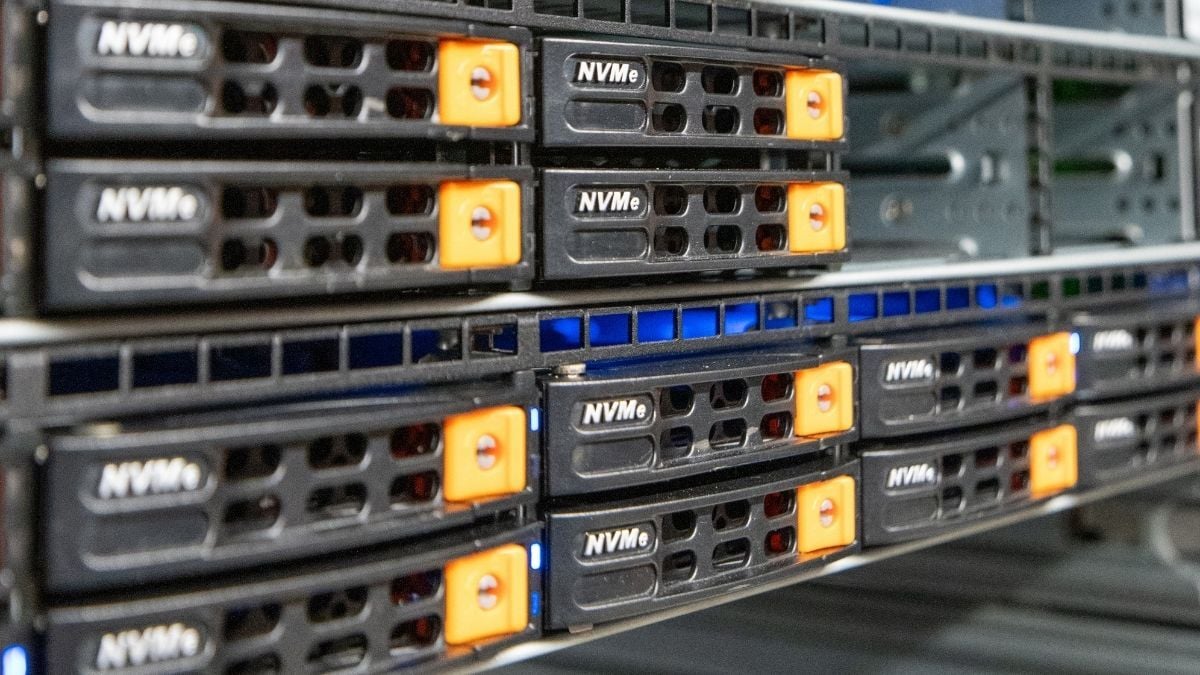
At NovoServe, NVMe is primarily delivered in U.2 form factor, which combines enterprise-grade reliability, hot-swap capability, and full PCIe performance. Some chassis also support NVMe M.2, but for production workloads U.2 is generally preferred due to better thermals, endurance, and serviceability.
NVMe excels in environments where storage performance directly impacts business outcomes:
- High-traffic databases
- Virtualization and container platforms
- AI and machine learning pipelines
- Analytics and big data workloads
- Financial systems and e-commerce platforms
- Game servers and real-time applications
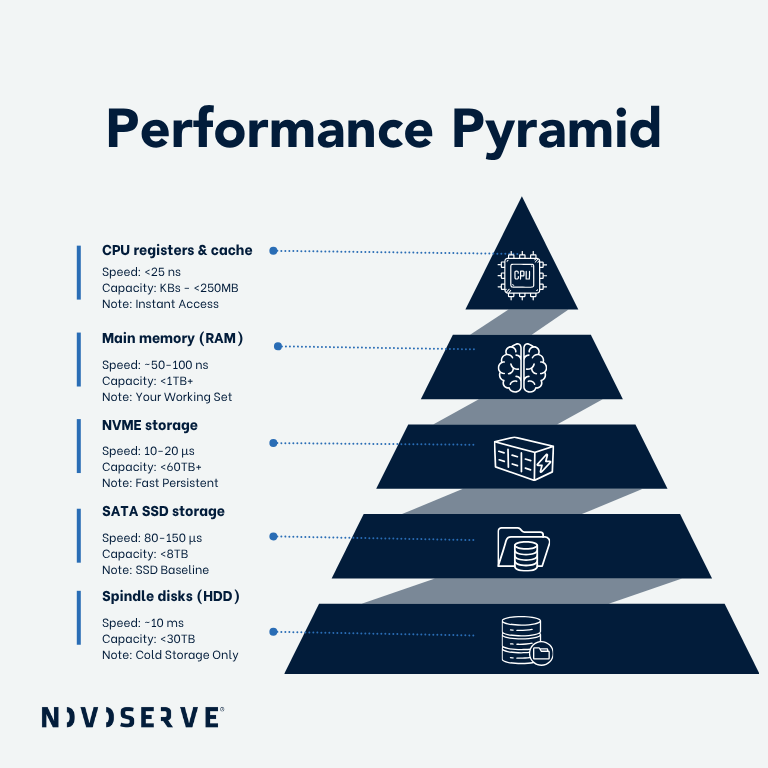 NVMe vs SATA SSD vs HDD
From a purely technical perspective, the data storage hierarchy is clear:
- HDDs offer capacity and affordability
- SATA SSDs offer solid performance at moderate cost
- NVMe SSDs deliver maximum performance and lowest latency
The important nuance lies in how your workload interacts with storage.
Sequential workloads with low concurrency may not fully benefit from NVMe. Random I/O, parallel access, and latency-sensitive applications almost always will.
In modern server deployments, CPUs rarely wait on compute — they wait on storage. NVMe minimizes that idle time.
RAID: combining performance, capacity, and resilience
RAID (Redundant Array of Independent Disks) allows multiple drives to operate as a single logical unit, trading off capacity, redundancy, and performance depending on configuration.
Both HDDs and SSDs can be used in RAID, but the implications differ significantly.
Common RAID levels
RAID 0 (striping)
Maximum performance, no redundancy. Suitable only for temporary data or cache layers.
RAID 1 (mirroring)
Strong redundancy with simple design. Read performance improves, write performance is slightly impacted.
RAID 5 / RAID 6
Efficient capacity usage with parity-based redundancy. Best for read-heavy workloads. Write-heavy applications may suffer.
RAID 10 (striped mirrors)
Combines high performance with redundancy. Requires more disks but offers excellent consistency and fast rebuild times.
For NVMe-based servers, RAID 10 is often the preferred choice when both performance and uptime are critical.
Hardware RAID vs software RAID
Software RAID relies on the operating system and consumes CPU resources. It is flexible and cost-effective but may impact performance under heavy load.
Hardware RAID uses a dedicated controller to manage the array independently of the OS. This results in:
- Lower CPU overhead
- Faster rebuilds
- More predictable performance
- Easier disk replacement
For performance-oriented or business-critical systems, hardware RAID is typically the better choice.
Design your perfect storage server
NovoServe’s dedicated server webshop allows you to tailor storage precisely to your workload. You can for choose flexibily between SATA SSD, HDD, NVMe SSD. If you need the maximum enterprise-grade speed performance and reliability, then choose chassis in our webshop that support up to 8 times U2 NVMe SSD. If you want high-capacity storage servers with large hdd arrays, why not choose our Supermicro chassis and add up to 792TB of data storage. You can also combine fast NVMe boot with data volumes of HDD-based backup tiers, and configure RAID level aligned with your performance and refundancy needs.
A common best-practice architecture is a tiered setup: Use NVMe U.2 SSDs for databases, VMs, and active datasets, and match them with SATA SSDs for application data or secondary storage, and HDDs for backups, archives, or cold data. This approach delivers maximum performance where it matters, without overspending on capacity that does not require NVMe speed.
In our server webshop, you can easily configure your demand. Have questions, why not click the chat button in the right bottom, and let our infrastructure experts design your ideal storage architecture.
Build your storage infrastructure
There is no single “best” storage type — only the best storage for your workload.
HDDs still play a role in capacity-driven scenarios. SATA SSDs remain a cost-effective upgrade for many applications. NVMe SSDs redefine what is possible when storage is no longer the bottleneck.
If your applications depend on low latency, high IOPS, and consistent performance, NVMe — particularly enterprise-grade NVMe U.2 — is the foundation of a modern storage server.
By carefully selecting your storage type and RAID configuration in the NovoServe webshop, you can build a dedicated server that scales with your workload, not against it.