

There are several situations in a dedicated server's lifecycle where a reboot is necessary, such as applying kernel updates on a Linux server or troubleshooting hardware. In this knowledge article, we cover the most common types of server reboot and how to perform them.
What are the most common situations for a server reboot
- After software installations: Ensuring new kernels or libraries are loaded.
- To restart internal processes: Clearing memory leaks or stuck services.
- Restoring connectivity: Resetting the networking stack if the server is unreachable.
- Accessing BIOS/UEFI: Necessary for hardware-level configuration.
- Soft Reboot: How to perform soft reboot
- Hard Reboot: How to perform hard reboot
- Cold Boot: How to perform cold reboot
- Power-cycle: How to perform power cycle
Soft Reboot
A soft reboot is performed using OS-level commands or management interfaces. This allows the operating system to gracefully stop running services, flush memory buffers, write pending data to disk, and properly unmount filesystems before reinitializing the kernel. This is the safest way to reboot a server.
The advantages of a Soft Reboot include:
- Minimizing a risk of data loss or filesystem damage
- Preservation of system integrity and logs
- Allowing automation and providing predictable behavior
- Safer for production environments
- Can be performed remotely
The risks of Soft Reboot are limited, mainly that the system is temporarily unavailable during the startup sequence.
Hard Reboot
A hard reboot is an immediate restart of a dedicated server performed by forcibly resetting the system at the hardware level, without a graceful shutdown sequence. It restores control when the OS is unresponsive but should only be used as a secondary option.
The advantages of a Hard Reboot include:
- It works even when the system hangs or command execution fails.
- It is necessary when malfunctioning NICs or RAID controllers require a full hardware reset.
- It allows recovery when a system fails during early boot stages (BIOS/UEFI).
The risks of Hard Reboot are more numerous than when performing a Soft Reboot and should always be taken into consideration. The main disadvantages are:
- Data loss risk: In-flight writes may be lost.
- Filesystem corruption: Especially on systems without journaling.
- Service instability: Applications may require manual recovery or integrity checks.
- Audit gaps: Shutdown logs will be incomplete.
Cold Boot
A cold boot starts a server from a fully powered-off state. This ensures complete hardware and firmware initialization, making it valuable for deep resets that a standard reboot server command cannot resolve.
The advantages of a Cold Boot include:
- Ensuring clean hardware initialization (Forces BIOS/UEFI to fully re-detect all hardware)
- Clears transient hardware states that survive regular reboots
- Ensures no cached or residual state influences startup
- Might help recovering from unstable runtime state
- Can be performed remotely
A cold boot is less disruptive than a forced power cycle if the system can still shut down cleanly
Power Cycle
A power cycle is the most intrusive reset and involves the complete physical removal of electrical power. This is the ultimate reset mechanism for a dedicated server and is typically performed by a datacenter engineer.
Unlike a soft or hard reboot, a power cycle:
- Fully resets the motherboard, CPU, memory, and all peripheral controllers.
- Clears residual electrical states in hardware components.
- Solves deep-rooted problems like unresponsive IPMI/iLO or electrical anomalies.
This might solve deep rooted problems, such as unresponsive hardware or firmware, persistent hardware faults or electrical or power-related anomalies. However, Power Cycle has more risks and operational impact than regular reboots.
- Longer downtime (requires human intervention).
- Higher failure exposure due to sudden power removal.
- No logging (No OS-level shutdown records are generated).
- Hardware stress (Repeated power cycling can reduce component lifespan).
- Cannot be performed remotely (requires coordination with our datacenter team).
A soft reboot can be performed directly from the operating system. Novoserve supported operating systems are all major Unix and Linux distributions, but as our customers you can install any compatible operating system on Novoserve servers.
Reboot Linux Server, the command to run from the shell is “shutdown –r now”, which will make the server reboot after shutting down.
Reboot Windows Server, either choose Restart option from the Start menu, or use a command prompt with command “shutdown /r /t 0”.
Reboot ESXi Server, use the vSphere Client or Host Client to place the host in Maintenance Mode, then right-click and select Reboot.
How to Perform Server Hard Reboot?Hard reboot can be best performed via the out-of-band management interfaces (IPMI for SuperMicro and iLO for HPE servers) which you can reach via the customer portal Portal Home > Client Area > My Products & Services > Manage your server.
For SuperMicro servers, look for a Power Button, which will allow you to Power On, Power Off, Power Reset, Software Shutdown, or launch a console where the option is easily spotted. From there, choose Set Power Reset or Power Reset.
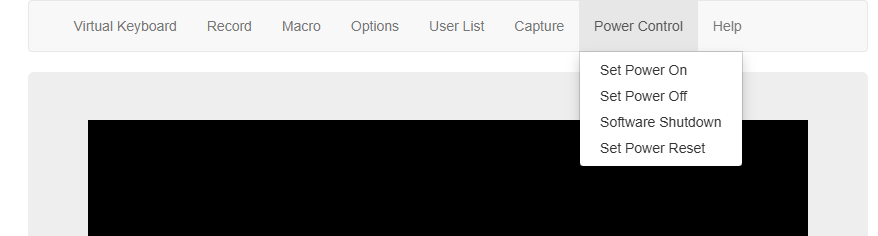
Perform hard reboot on Supermicro server gen10/11

Perform hard reboot on Supermicro server gen12
For HPE servers, depending on the generation and iLO version -
iLO 4 (8th gen/9th gen) - Either open console and choose option Reset, or look at the bottom right corner of the iLO page for power indicator and options.
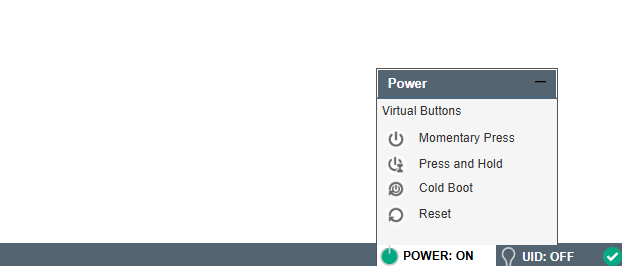
Perform HPE server hard reboot on iLO 4
iLO 5 (10th gen) - Either open console and choose option Reset, or look at the top right corner of the iLO page for power indicator and options.
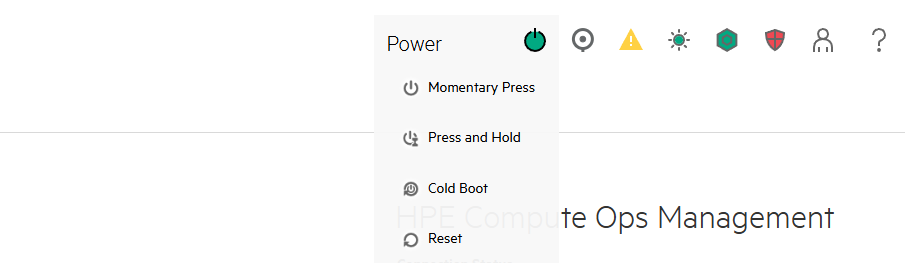
Perform HPE server hard reboot on iLO 5
How to Perform Server Cold Reboot?Cold Boot can be performed either via the customer portal Portal Home > Client Area > My Products & Services > Manage your server, or directly from the out-of-band management interface. From customer portal, choose the Cold boot option.
For HPE servers, choose the Cold Boot option from iLO page or from console, for SuperMicro servers, depending on the generation, choose the option of Set Power Off, allow some time to pass and then Set Power On, or option Power Cycle if present.
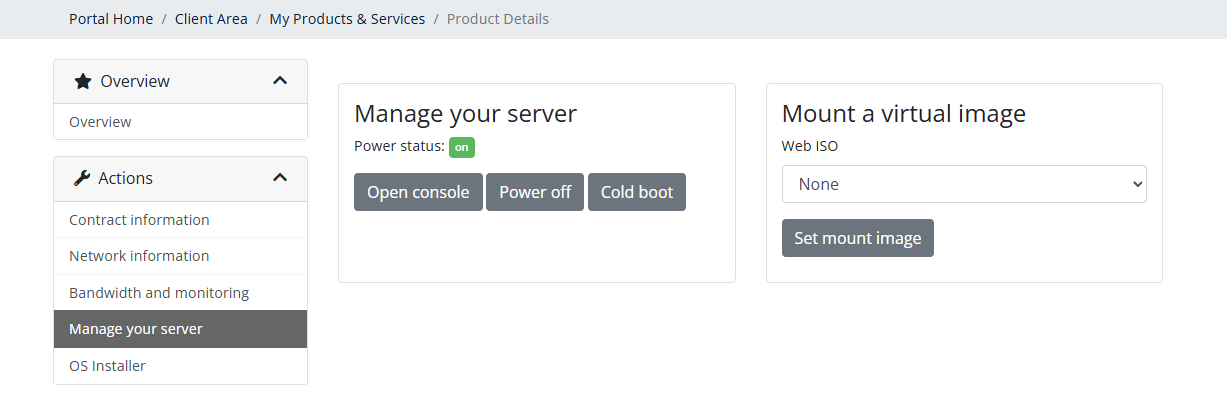
Perform cold reboot in NovoServer portals
Power Cycle
Physical Power Cycle cannot be performed remotely. If you need to perform Power Cycle, please submit a support ticket via Customer Portal. Don’t forget to mention which server you need power cycled and if there is a specific time slot when the action should be performed.
💡 If you have problems with performing server reboot, please don't hesitate to contact our customer support team via the portals.
🛍️ Do you not have dedicated servers with NovoServe yet? Deployment is simple and instant. Build your servers now.